
When a developer says their Apple Developer account has been "banned," that word can describe different account states. This matters because the correct next steps depend not only on the reason for the action, but also on the stage of the termination process.
In one scenario, Apple has already terminated the account's participation in the Apple Developer Program: App Store Connect shows the status Closed, and normal access to Developer Support may be restricted. In another scenario, the developer receives a Pending Termination Notice — a warning that the account is scheduled for termination. Restrictions may already be applied, but the account may not yet appear as Closed, and App Review usually still provides a path for a full appeal.
So the first thing to do after receiving a message from Apple is not to send the same generic letter through every available form. First determine exactly which type of notice you received.
A step-by-step breakdown of both scenarios — Notice of Termination and Pending Termination Notice — with a live demonstration of the Apple Developer interface.
Why Apple May Ban a Developer Account
Apple may terminate a developer's participation in the program for violations of the App Review Guidelines, the Apple Developer Program License Agreement, and other applicable agreements.
Among the situations that can lead to serious enforcement actions, Apple specifically identifies attempts to manipulate or cheat the App Review process, misleading content, manipulative or fraudulent behavior, and other violations of the Developer Code of Conduct.
In practice, a termination notice may also contain allegations related to associations with other problematic Developer accounts, reused resources, apps, or other signals that Apple considers connected to dishonest or fraudulent activity.
Apple does not always disclose the full internal logic behind its review. That is why an appeal should not be built only around guesses about which IP address, device, Apple Account, payment method, or other factor may have triggered the system.
The primary source of information is Apple's own message. Look for the specific agreement section, Guideline, description of the alleged violation, and wording that describes the account's current status.
First, Determine the Type of Termination
This article covers two scenarios:
- Notice of Termination — the account is already closed;
- Pending Termination Notice — Apple has notified you of planned termination, but the process is still at a stage where an appeal through App Review can usually be submitted.
These situations may look similar from the outside: apps and payments can be restricted, and Apple's message may contain serious allegations. But the available support channels are different.
Scenario 1. Notice of Termination: The Account Is Already Closed
If Apple has already terminated the account's participation in the Developer Program, one of the first signs will be the account status in App Store Connect.
Open App Store Connect and click the profile in the upper-right corner. In the scenario shown here, the Developer account is marked CLOSED.
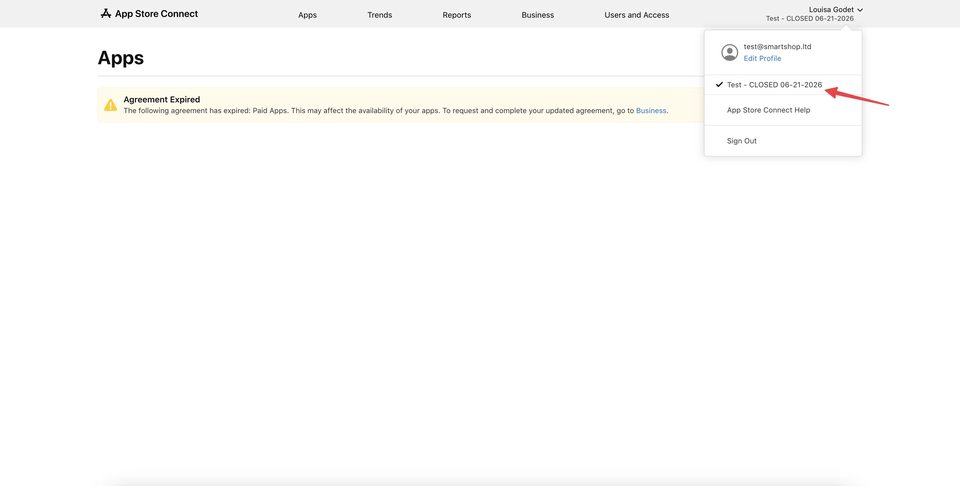
This is fundamentally different from a Pending Termination Notice. A Closed status means this is no longer simply a warning about possible removal: the Developer membership has effectively been terminated.
Depending on the account state, some sections of App Store Connect may still open, but normal operation of the Developer account has already been disrupted. At this point, it makes more sense to focus on requesting a review of the termination than trying to continue normal app publishing.
What Happens to Developer Support After a Notice of Termination
The next step is to open developer.apple.com using the same Apple Account and check whether Developer Account and support are still available.
When the account is already closed, the full Developer Support menu may no longer be available. Instead of the normal list of support topics, Apple may show a special page titled Need assistance with accessing your developer account?
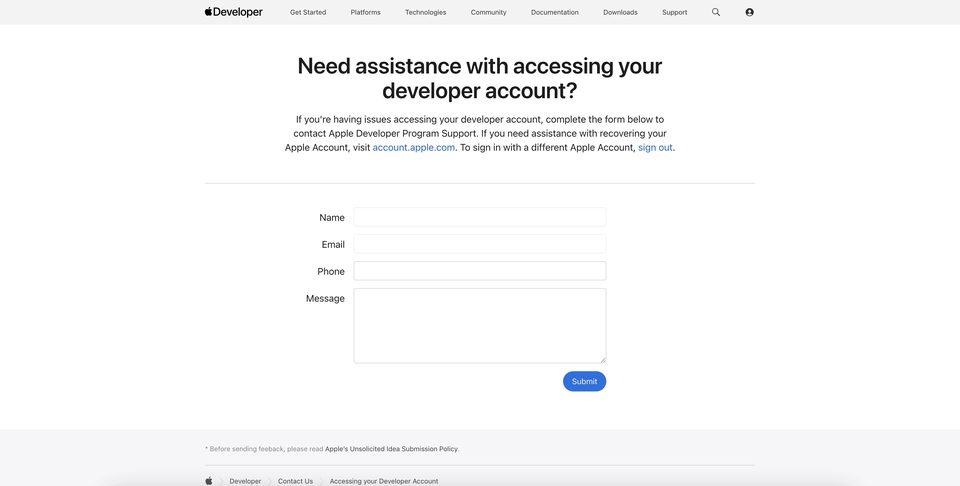
This page provides a form with Name, Email, Phone, and Message fields. In this account state, it may be the main available channel for contacting Developer Program Support.
In the message, keep the explanation short and specific:
- state that the Apple Developer Program membership was terminated;
- ask Apple to review the decision or clarify whether the account can be reinstated;
- mention the reason or agreement section Apple cited;
- explain why you believe the decision was incorrect or what violations have already been corrected;
- state what verifiable facts or documents you can provide.
There is no need to turn the first contact into a long emotional letter. It is better to give Apple clear context and leave room for the team to request additional information.
After submitting the form, wait for a response at the email address included in the request.
Can an Already Terminated Account Be Reinstated?
Termination itself does not mean reinstatement is impossible in principle. Apple's materials provide a way to request review of a terminated membership and submit a written explanation of why the account should be reinstated.
However, this should not be presented as guaranteed recovery. The decision remains with Apple, and the result depends on the reason for the termination, the quality of the appeal, and whether the developer is able to address Apple's concerns convincingly.
If Apple cites a specific violation, the appeal should respond directly to that issue. A statement such as "we did nothing wrong, please unlock the account" gives the review team very little new information.
Scenario 2. Pending Termination Notice
A Pending Termination Notice looks different.
Usually, the developer first receives an email saying there is a new message from App Review. The actual Pending Termination Notice appears inside App Store Connect, in the app's communication or App Review section.
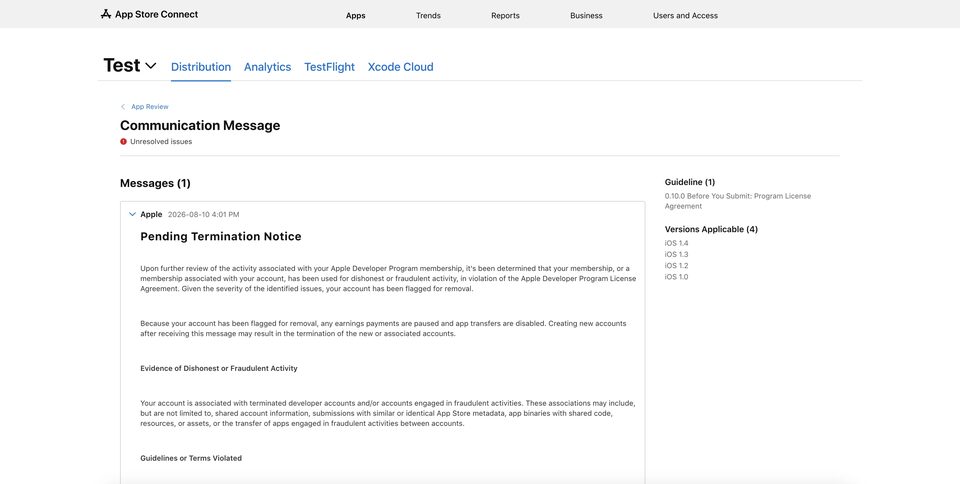
The word Pending should not be interpreted as "nothing serious has happened yet." Apple may already state that the account is flagged for removal and impose restrictions before the membership is finally closed.
For example, a Pending Termination Notice may pause payments and disable App Transfers. Apple may also warn that creating new related Developer accounts after receiving such a notice could result in their termination as well.
Trying to urgently "move" to a new account instead of resolving the current case is therefore risky.
The Key Difference with a Pending Termination Notice
With a Pending Termination Notice, developer.apple.com often remains accessible. This allows you to open the full support section and use the App Review contact form.
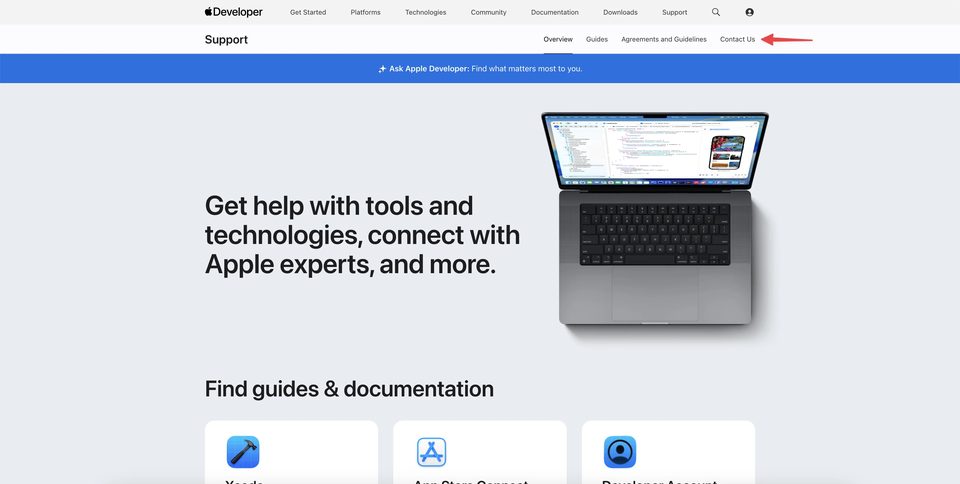
In the example shown here, the path starts with Developer Support → Contact Us.
Then select App Review.
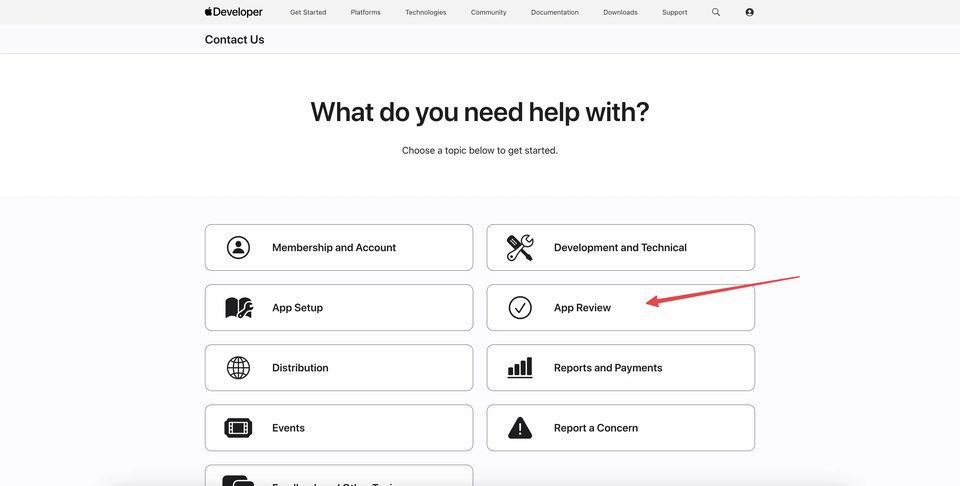
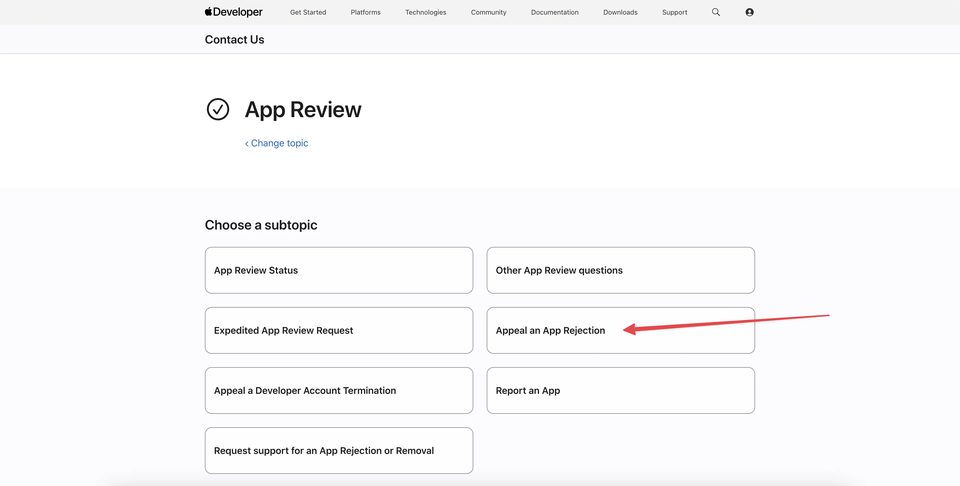
Apple then displays the available support subtopics.
In the interface from our example, select Appeal an App Rejection. The same page may also show a separate option related to appealing a Developer Account Termination, so the exact list of options can change over time.
On the next screen, click Contact App Review.
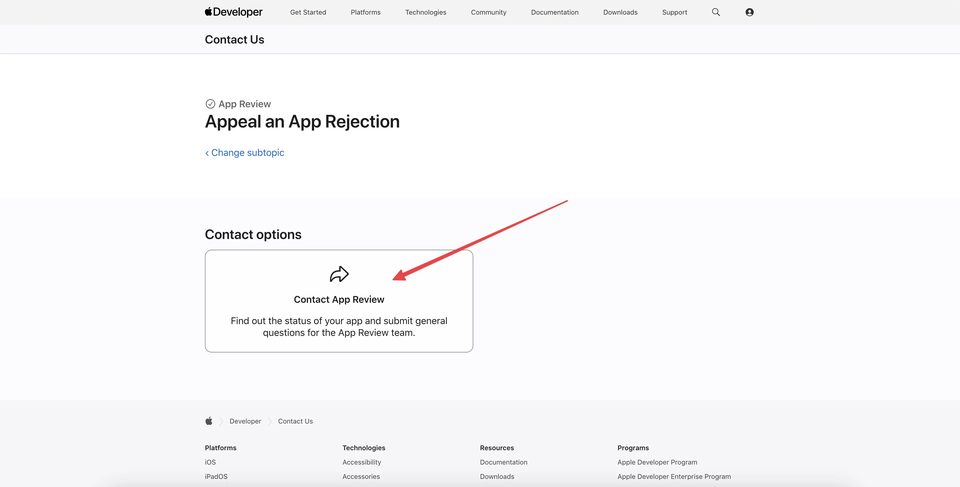
Apple then opens the appeal form.
How to Complete an Appeal for Pending Account Termination
In the form, select the app associated with the Pending Termination Notice and specify the reason for the appeal.
If Apple's message cites a specific section of the App Review Guidelines or Developer Program License Agreement, choose the matching violation. If no option fits or the notice is more general and account-level, the interface shown here allows you to select Other issue.
Then, in the separate appeal type field, select Pending Account Termination.
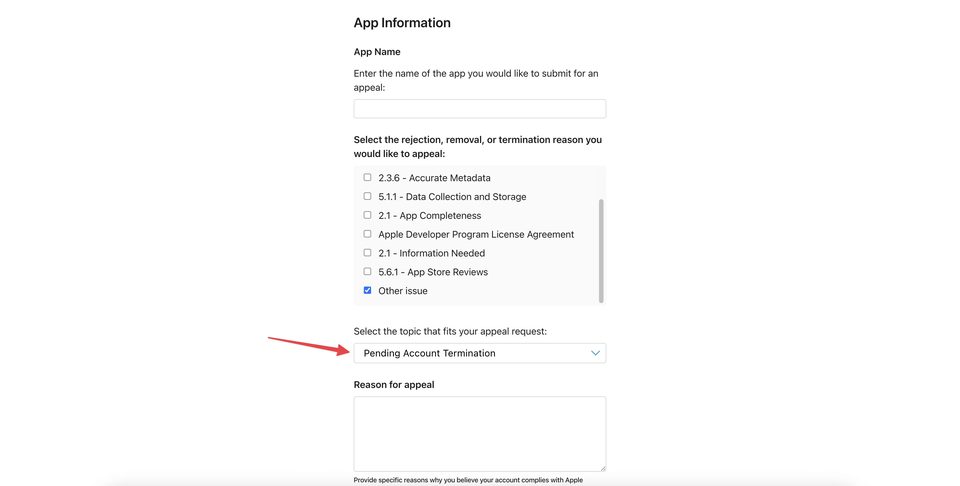
After that, complete the Reason for appeal field.
This is where it is especially important not to send the same generic text used for every account ban.
What to Write in an Apple Appeal
A strong appeal should address Apple's concerns rather than simply ask for "another chance."
A useful structure is:
- Briefly state what notice you received and which app or account it concerns.
- Refer to the specific Guideline or agreement section if Apple cited one.
- Explain the factual situation without unnecessary speculation.
- If you disagree with Apple's conclusion, provide specific reasons and evidence.
- If an actual issue existed, explain exactly what was corrected.
- Describe the changes that will prevent the issue from happening again.
- Ask the App Review Board to reconsider the decision.
Apple's guidance on appeals also emphasizes specificity: explain why the app complies with the requirements and respond to requests for additional information.
The fewer generic statements the appeal contains, and the more verifiable facts it provides, the more useful it will be during reconsideration.
What to Attach to the Appeal
The right supporting material depends on the allegation.
If the issue concerns app behavior, useful materials may include screenshots, a full video walkthrough, a test account, an explanation of backend logic, or clarification of dynamic content.
If Apple raises concerns about rights to content, brands, or licenses, provide documents that demonstrate those rights.
If the issue is misleading metadata, show the updated metadata and explain what was changed.
If the problem relates to account information or the Developer Program License Agreement, only real documents and facts that directly address the allegation are useful.
Do not attach dozens of irrelevant files in the hope that the volume alone will help. The purpose of an appeal is to make the review easier, not harder.
Should You Create a New Developer Account?
If you receive a Pending Termination Notice or Notice of Termination, do not automatically assume that creating a new account is a safe solution.
Apple's notices may explicitly warn that new or associated accounts are also at risk of termination. In addition, if the original reason for enforcement has not been resolved, a new account does not solve the underlying problem.
First analyze Apple's message, use the appropriate appeal channel, and wait for the result of the review.
How to Quickly Tell the Two Scenarios Apart
Typical signs of a Notice of Termination:
- Apple states that the membership has been terminated;
- the account already appears as Closed in App Store Connect;
- full Developer Support may no longer be available;
- a special form for Developer account access issues may appear instead.
Typical signs of a Pending Termination Notice:
- the actual notice appears in App Store Connect/App Review;
- the account may already be subject to serious restrictions;
- payments and App Transfers may be paused if the notice says so;
- Developer Account may still be accessible;
- Contact Us → App Review still provides a path to submit a full appeal with the Pending Account Termination type.
This does not mean Apple's interface will always look exactly the same. Apple changes Developer Support and App Store Connect over time, so the account status and wording of the specific notice should be your primary reference.
What Not to Do After Receiving a Termination Notice
Do not send several contradictory explanations through different channels. If one form admits a violation while another claims it never happened, that does not help your case.
Do not invent technical reasons for the ban if Apple did not provide them. You cannot reliably know which internal signal led to the decision.
Do not try to hide facts that Apple can verify through the app and account history.
And do not delay reviewing the notice. While a full appeal path is still available for a Pending Termination, it is better to prepare a clear, focused response.
Conclusion
If your Apple Developer account is banned, first determine what actually happened: Notice of Termination or Pending Termination Notice.
With a Notice of Termination, the account may already appear as Closed and normal Developer Support may no longer be available. In that case, Apple may provide a special Developer account access form through which you can request a review of the situation.
With a Pending Termination Notice, the account is already under serious threat of removal and restrictions may apply immediately, but developer.apple.com usually remains accessible. This allows you to go through Developer Support and App Review and submit a full appeal using the Pending Account Termination type.
In both scenarios, the key principle is the same: read Apple's message carefully and respond to the specific concerns it raises. The clearer you are about the facts, corrections, and reasons for reconsideration, the more useful information Apple will have when reviewing the account again.
Individual $350 · Company $650 · Renewal $200. Accounts with a 7-day guarantee. Contact us — we'll find the right option for you.
Message on Telegram