
Partner material: this article was prepared in collaboration with MangoProxy.
Open the client's network settings before shopping for proxies for mobile apps. That determines whether you can assign an IP to a project and use the required location.
What a Proxy Changes in an App's Connection
Once an app's request goes through the proxy, it arrives at the service with the proxy's outgoing IP. That address can be assigned to a project after its route has been verified.
Regional content checks call for a connection in the relevant country. A daily task may call for keeping the assigned address. Unrelated data-collection requests can instead use different IPs.
Next comes the app setup. There may be a proxy setting inside the client; otherwise, a networking tool compatible with the app is needed. On Android, the system's HTTP proxy setting is a recommendation that apps can ignore. An IP-check page opened in the browser tells you about that browser visit. The app still needs a check of its own.
A trial of proxies for mobile traffic should include requests sent by the app itself. The saved phone setting still needs to be checked against that traffic.
Keeping Track of Each Account’s Connection
With a separate IP for each account, staff can look up a project's address when it fails. An independently configured project can have its connection replaced while the others keep theirs. Whether each account needs its own address depends on the job and the app.
If staff switch accounts within one client, check the scope of its proxy setting. One proxy setting may cover every account in the app, or even the whole device. The spreadsheet might list five connections while the client uses just one.
For independent environments, separate the saved data as well as the network configuration. The proxy does not create those environments itself.
Shared IPs also occur during ordinary Wi-Fi use and do not, by themselves, establish a violation. Separate addresses cannot guarantee freedom from security checks either. For example, Telegram lists IP addresses, device details, and client information among the data it may collect for security and abuse prevention.
Write down the location, language, and time zone the job calls for. Record them before a regional test. An IP change does not automatically change the device's time zone or the location data available to the app.
Comparing the Proxy Types
When choosing proxies for accounts, consider the network behind the IP and what makes the address change. ISP and datacenter products both come in static and dynamic forms.
| Type | When to consider it | What to check |
|---|---|---|
| Residential proxies | Regional content checks and independent data collection | Available locations, rotation rules, and temporary IP retention. |
| Static ISP proxies | Related actions or longer workflows requiring one address | Location, IP allocation, and compatibility with the working client. |
| Mobile proxies | Checks that call for a mobile carrier's outgoing IP | The available carrier and location, plus the IP retention or rotation rules. |
| Datacenter proxies | Testing and bulk requests to sources accepting this access | A connection trial and the static or dynamic IP option. |
A phone on Wi-Fi already illustrates why mobile apps and mobile IPs are different questions. Use a carrier connection when the job specifically calls for one. The device retains its own characteristics whichever proxy type you select.
MangoProxy offers all four types in the table. Its main residential range includes city selection for city-specific checks; other products have different geographic targeting options. HTTP(S) and SOCKS5 are available. Run a trial in your client using the protocol and authentication you plan to keep.
For work requiring a fixed address, promo code SMARTSHOP gives you 7% off MangoProxy Static ISP Proxies. If the job needs rotating addresses, choose for that requirement even when a fixed-address plan has a discount.
Returning With the Same IP
Save a static IP in the project setup, and the next visit can use that address again. When something fails, staff can identify the connection to investigate. An expired login still needs to be restored through the app; retaining an address will not recover deleted app data.
Proxy rotation suits work that can use different outgoing addresses. An independent regional check, for instance, may not need the previous IP. A login followed by selecting preferences and reading the result is a connected sequence. Decide whether to retain the address through those steps before starting them.
Look at the sticky-session terms if a dynamic product offers them. This mode holds an IP temporarily, so the expected duration and handling of a dropped connection matter. A long job cannot rely on the word 'sticky' alone as evidence that its address will remain fixed.
Trying the Connection Before Committing
The working client. Use the planned credentials and protocol in the trial. A SOCKS5 authentication method that the client won't accept needs resolving in that setup. Also check how the app sends the operations the job requires.
Location options. Need a particular city? Find it in the targeting menu of the geo-targeted proxies under consideration. A list of countries tells you nothing about city selection. For a carrier-network task, also check which mobile connections are available.
Workflow duration. Note which actions run together and when an address change is acceptable. Check IP allocation terms for a lasting project assignment, or rotation rules for a dynamic product.
Independent environments. Before ordering proxies for multiple accounts, locate the individual assignments in the client, profile, or device configuration. Buying additional IPs does not create separate environments.
The actual task. Reopen the app and try the content and actions the project uses. Check the outgoing address too. Connecting successfully tells you less than completing that working task.
Where Account Setups Go Wrong
Different spreadsheet assignments, one app connection. The spreadsheet can be correct while the client has just one proxy setting for all accounts. Inspect what that setting covers.
Sharing an IP without considering the jobs. A shared route makes it harder to assign traffic and investigate a failed independent project. That administrative drawback is not evidence that every shared IP causes restrictions.
Changing the location or IP during related actions. A failure after the change leaves another variable to investigate. Make changes at a planned point and keep their history.
Treating a phone as a reason to buy mobile proxies. Work out whether the job needs a carrier IP. A fixed ISP address may fit ongoing work; independent checks may fit a rotating residential option.
Testing only the browser. The app may use another connection. Verify traffic from the working environment instead of extending a browser IP-check result to the whole phone.
Organizing the Accounts and Connections
Start with one project and record the assignment:
Account → Separate working session → Assigned proxy/IP → Required location.
This describes how the work is organized, rather than a sequence of network hops. The session needs a tool that applies its network settings. If one configuration covers the entire client, use an environment where the connection can be assigned separately.
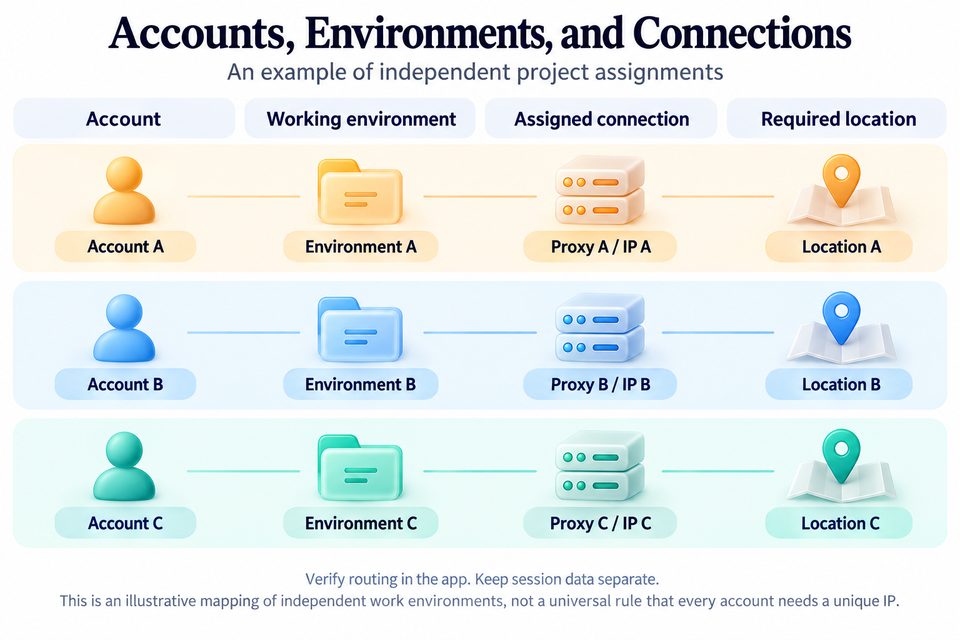
Under the environment's name, record the task, IP type, location, and rotation setting. Use a connection label in that record and store the credentials securely elsewhere.
Configure one environment first. Verify the IP and location, do a routine piece of work, and restart the app. See whether the connection settings persist. Repeat the setup for the remaining environments and verify their assigned connections individually.
This is the network part of the setup that proxies for multi-account management handle. If an app requests additional verification, record the last action and recent configuration changes. Follow its account recovery procedure: replacing the IP alone may not resolve the issue.
Conclusion
In our example, the daily project can have a fixed address, while regional checks use separate environments with the required locations and rotation rules. Choose a mobile network when the check calls for one. The purchase comes after those decisions. Then try the chosen connection in the app staff will use.
FAQ
Which proxies can I use on a phone connected to Wi-Fi?
Residential, ISP, and datacenter options can all be used with a compatible setup. Wi-Fi doesn't decide which one to buy. Look at the work you need to do, and choose a carrier IP only for a task requiring a mobile network.
I bought several IPs. Why are my accounts still using the same one?
Check the scope of the client's setting. If it applies across the app, switching accounts may not change the connection. Separate IPs require suitable client features or separate working environments.
What remains unchanged after switching IPs?
A proxy does not change app data or device characteristics. The assigned address helps manage the connection, but does not guarantee protection against account restrictions.
Ready accounts with a 7-day guarantee. 10+ GEO options. Pay only after verification.
Order on Telegram