
Losing a SIM card, having an old phone number disconnected, or being unable to receive an SMS with a two-factor authentication code is one of the most frustrating situations for an Apple Developer account owner. This is especially serious when the account is already used to publish apps, manage subscriptions or payouts, or when a team depends on access to App Store Connect.
The good news is that losing the phone number itself does not mean losing the account. If you know the Apple Account credentials and can confirm that the account really belongs to you, Apple provides an official access recovery process called Account Recovery.
It is important to understand the difference between a normal sign-in and account recovery. During a standard sign-in, Apple verifies the password and a second factor: a code sent to a trusted device or trusted phone number. If you have access to neither the devices nor the phone number, the system has to move to a longer identity verification process. That is why account recovery should not be viewed as an instant phone number replacement.
Watch the full walkthrough of this topic: youtube.com/watch?v=ad4cJF3s4MI
Why Access to the Phone Number Matters for an Apple Developer Account
An Apple Developer account is connected to an Apple Account — the current name for what was previously known as an Apple ID. Two-factor authentication protects it not only with a password, but also with verification through a trusted device or phone number.
When you sign in from a new browser or device, Apple will usually request a six-digit code. It may appear on an already signed-in iPhone, iPad, or Mac, or arrive by SMS or voice call to a trusted phone number.
So the problem is not the missing SIM card itself. The issue is that the system loses its usual way to verify your identity.
If you still have at least one trusted Apple device, the situation is usually easier: you may be able to approve the sign-in or change your security settings from that device. Full Account Recovery is primarily needed when you have access to neither trusted devices nor a trusted phone number.
What to Check Before Starting Account Recovery
Before submitting a recovery request, make sure there is no faster option available.
Check whether the account is still signed in on an old iPhone, iPad, or Mac. Sometimes a user no longer uses a device every day, but the Apple Account remains active on it. Such a device may allow you to receive a verification code or change the trusted phone number without waiting for several days.
Also check whether a second trusted phone number is already linked to the account. Apple recommends having an additional number specifically in case access to the primary one is lost.
If there is no trusted device and no accessible trusted phone number, it makes sense to proceed with the official Account Recovery process.
Step by Step: How to Submit an Account Recovery Request
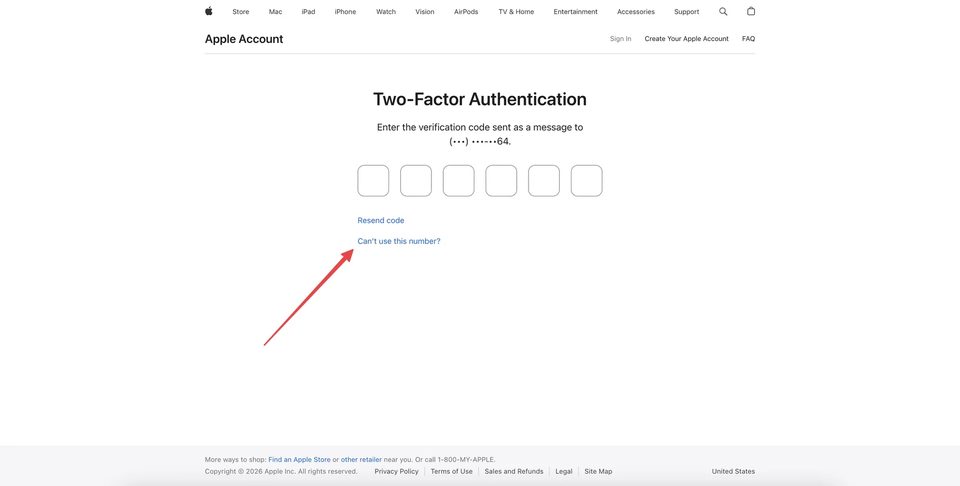
Start signing in to your Apple Account at account.apple.com. Enter the login and password. You will then see the two-factor authentication screen requesting a verification code.
If the code is being sent to a phone number you can no longer access, select Can't use this number?. If the system first asks you to approve the sign-in from a trusted device, indicate that you do not have access to that device either and continue until you reach the option for the unavailable phone number.
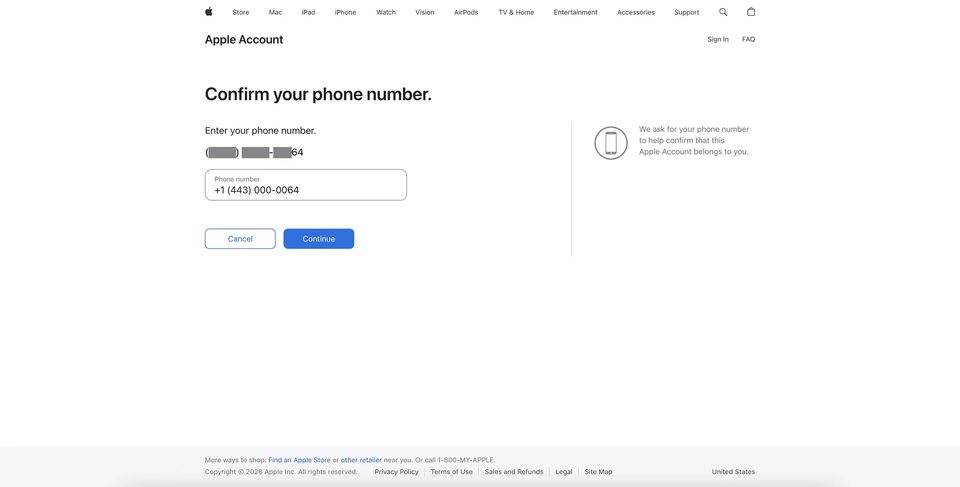
At the next stage, Apple may ask you to confirm the old trusted phone number. This does not mean you need to receive an SMS on it. The system uses the full number as one of the details known to the account owner.
Enter the phone number that was linked to the Apple Account in the requested format.
After confirming the old phone number, the system will show several options: get a code from a device, use the phone number, or continue without access to either method.
If you truly have access to neither a trusted device nor a working phone number, select the recovery option that does not require access to Apple devices or the phone number.
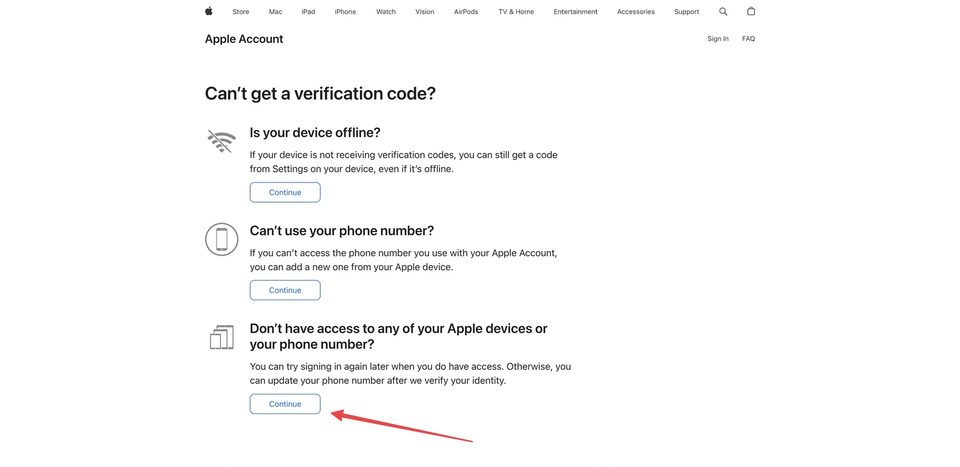
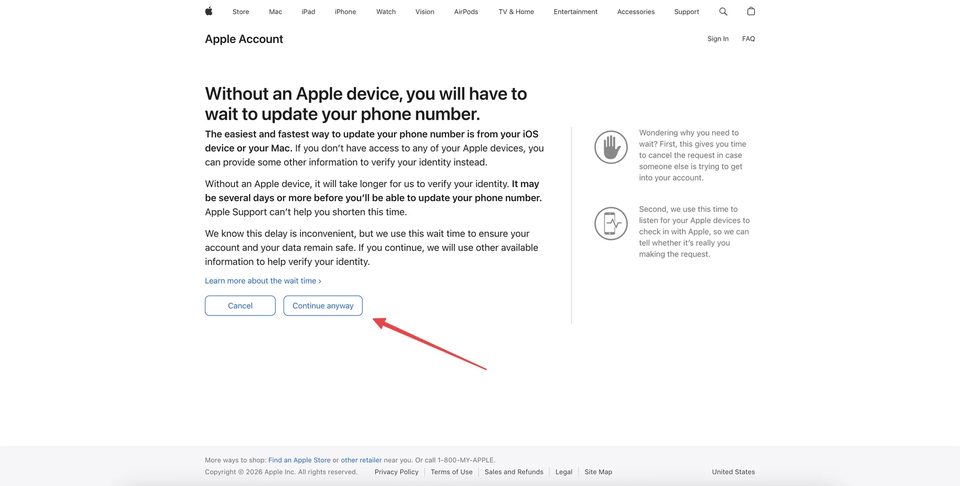
Apple will then warn you that verifying your identity will take some time. This is an important stage: the system effectively moves the account from the normal two-factor sign-in flow into the Account Recovery process.
Click Continue anyway if you are sure the normal sign-in methods are unavailable.
What Information Apple May Request
The exact set of verification steps depends on the specific account. You should not expect the process to look exactly the same for every user.
In the scenario shown here, Apple asks you to confirm access to the email address. If you can access the email, it is better to complete this step and enter the code you receive: this gives the system an additional signal that the request is being made by the legitimate owner.
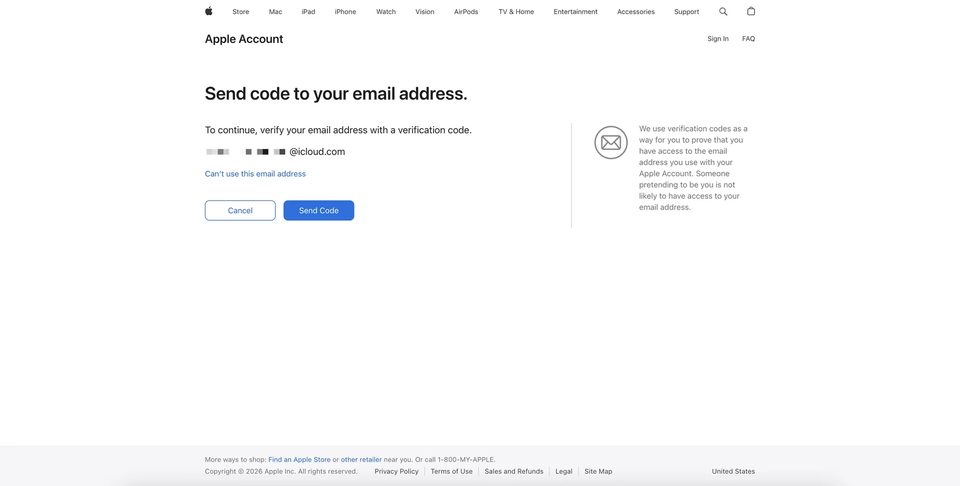
If you also do not have access to the email address, the interface may allow you to continue without it. Some accounts may also show additional questions or requests for information associated with the account, such as payment method details.
Do not guess the information. Enter only details you are confident are correct. Account Recovery relies on a combination of checks, so random answers or repeated attempts do not help speed up the process.
A New Phone Number for Contact
One of the key stages is providing a new phone number that you can reliably access.
Apple can use this number to send notifications and further recovery instructions. It is therefore better to use a number that you personally control and do not plan to change in the near future.
Select the country or region, enter the new phone number, and choose how you want to receive instructions — by SMS or phone call, if that option is available.
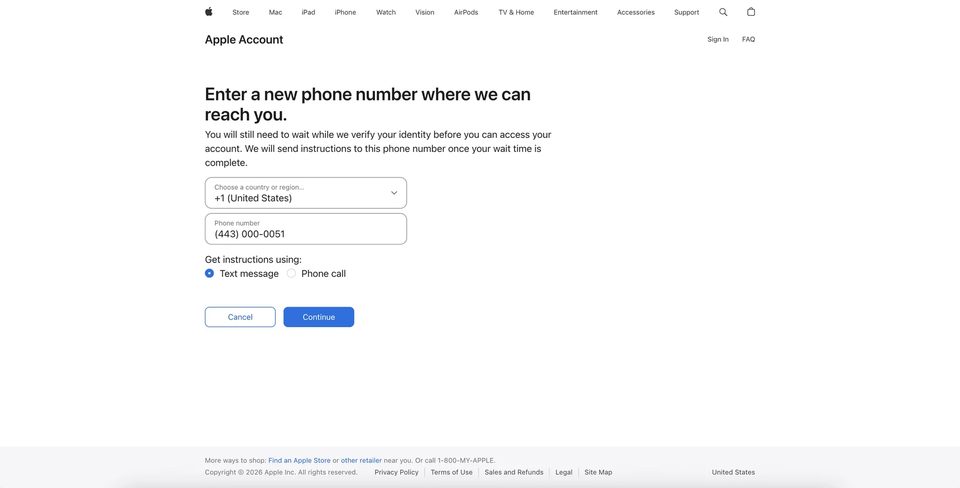
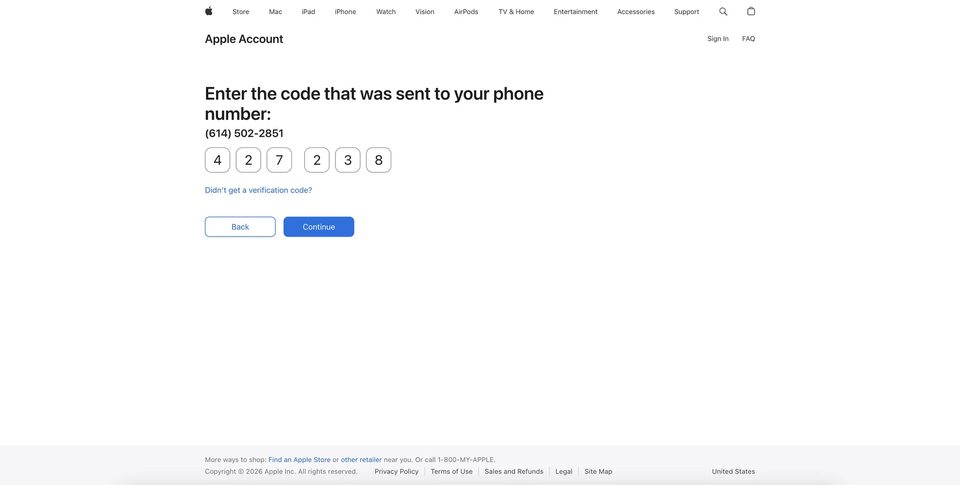
You will then need to verify the new phone number with a code.
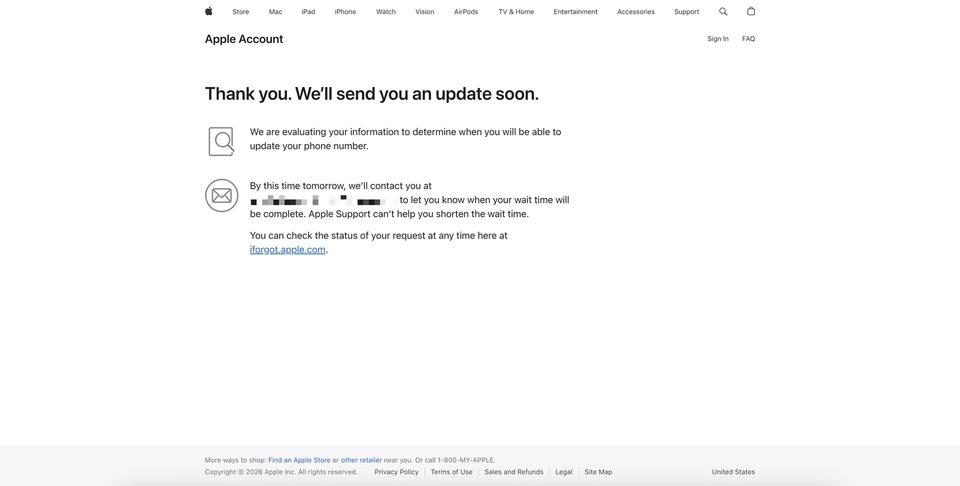
After successful verification, the recovery request is considered submitted. A message will appear explaining that Apple is evaluating the information you provided and will later tell you when you can update the phone number and regain access to the account.
How Long Does Apple Account Recovery Take?
It is important not to rely on one fixed recovery period.
In a particular recovery scenario, the wait may be around one week. However, Apple officially uses more cautious wording: Account Recovery may take several days or longer. The exact timing depends on the information the system can use to verify your identity.
After the process begins, Apple usually sends confirmation of the request and information about when access may be restored. According to Apple's official documentation, an email with the recovery date and time may arrive within 72 hours after Account Recovery is started.
Apple Support cannot manually shorten the waiting period. This is not a queue that an agent can speed up — it is a security mechanism. After submitting the request, all you can do is wait for the official notification.
Why You Should Avoid Random Sign-In Attempts
When access to a work account is lost, the natural reaction is to try everything at once: different browsers, different devices, VPNs, new IP addresses, repeated password resets, and multiple simultaneous support requests.
But during account recovery, this kind of activity can create additional problems.
Apple explicitly warns that using devices already signed in to the Apple Account after starting Account Recovery may interrupt or cancel the process. If recovery was started on the web, Apple recommends not using devices signed in to that account until the procedure is complete.
For this reason, once the recovery request has been submitted, it is better not to experiment. Make a note of which email address or phone number was used to start recovery, keep access to the new phone number, and wait for the official notification.
You should also avoid starting multiple recovery requests one after another. If you have already submitted a request, first check its status at iforgot.apple.com.
Can Apple Support Speed Up the Process?
No. This is one of the most common questions from Apple Developer account owners.
Support can explain the general procedure, but it cannot shorten the Account Recovery security waiting period. The reason is security: if an agent could manually remove the waiting period after a chat request, the recovery mechanism would become much more vulnerable to social engineering and attempts to take over someone else's account.
That is why the strategy of "contacting several chats until you find someone who can speed it up" usually does not work.
What to Do After Regaining Access
As soon as Apple allows you to recover access, complete the procedure using the instructions sent by SMS, phone call, or another Apple notification. After signing in, immediately review the security section of your Apple Account.
First, make sure the new phone number has been added as a trusted number and can actually receive verification codes. Then review the list of trusted devices and remove any devices you no longer use.
For work-related Apple Developer accounts, it is reasonable to add an additional trusted phone number if this fits your account management model. This reduces the risk of the same situation happening again.
Also check access to Apple Developer and App Store Connect, user roles, and whether payment and contact information are still current. Recovering the Apple Account itself restores your ability to authenticate, but after a long period without access it is worth making sure all related settings are still correct.
How to Reduce the Risk of Losing Access in the Future
The main preventive measure is not to build your account security around a single phone number.
If the Apple Developer account is critical for publishing and maintaining apps, plan backup ways to verify your identity in advance: keep trusted phone numbers up to date, including a backup number, and maintain a securely protected trusted device.
Do not share two-factor authentication codes with third parties, and do not store account credentials in random chats. For team workflows, it is better to use roles and invitations in App Store Connect rather than sharing the main Apple Account with several employees.
Also make sure the phone number linked to the account is not temporary. Losing a number most often becomes critical when the user notices too late that the SIM card has already been deactivated or the number has been reissued.
Conclusion
Losing the phone number linked to an Apple Developer account does not automatically mean losing the account itself. If you do not have a trusted device and cannot receive a code on the old number, Apple allows you to start the official Account Recovery process and verify your identity through other available methods.
The key is to act consistently: check available trusted devices and phone numbers, follow the official recovery flow, provide a new working phone number, confirm the information available to you, and avoid unnecessary account activity after submitting the request.
Recovery may take several days or longer, and Apple Support cannot speed up the waiting period. But if the request is submitted correctly and Apple is able to verify that the account belongs to you, you can regain access and update the trusted phone number once the verification process is complete.
Individual $350 · Company $650 · Renewal $200. Contact us — we'll find the right option for you.
Message on Telegram