
Partner material: this article was prepared in collaboration with SX.org.
Launching ads in a new country takes more than translating your creatives and setting a budget. Before sending paid traffic, check the entire user journey: from the campaign link to the landing page and through to your app’s page on the App Store.
Opening the page on your own device only shows you one version of that journey. To test other markets, you need a repeatable process: which page should load, which language should appear, where each button should lead, and what should happen to your campaign parameters.
This guide walks you through a practical pre-launch checklist, explains where SX.org proxies fit into the workflow, and highlights the checks you should complete separately on an iPhone.
What to Check Before Launching Ads
Start by defining the scope of your test. For a campaign that sends users to your app’s website, the basic journey looks like this:
Campaign link → landing page → download button → App Store product page.
If your setup includes a tracking link, an intermediate page, or additional redirects, include those steps in the test.
Define the expected result at each stage:
| Stage | What to check | What a successful result looks like |
|---|---|---|
| Campaign link | The complete URL, including campaign parameters | The user reaches the intended page |
| Landing page | Availability and layout | Core content and buttons are accessible |
| Localization | Language, images, copy, and offer details | The page matches the requirements for that market |
| Redirects | Intermediate URLs and final destination | No errors, redirect loops, or unexpected destinations |
| Download button | The app destination | The correct app’s product page opens |
| Analytics | Parameters and events required by your measurement setup | Data is passed according to your implementation |
Not every element needs to change by country. If you use one English-language landing page across several markets, the same language may be the correct result. Test against your project requirements rather than assuming every country should receive a different experience.
Build a Country-by-Country Test Matrix
Before configuring any tools, create a simple test sheet. It will help you compare results and reproduce issues after a fix.
For each market, record:
- The complete campaign URL.
- The connection country.
- The browser language.
- The device and browser.
- The expected landing page version.
- The expected final destination.
- The test date, result, and screenshots.
For example:
| Market | Browser language | Expected landing page | Final destination | Status |
|---|---|---|---|---|
| Germany | German | German version | App Store product page | Not tested |
| United Kingdom | English | English version | App Store product page | Not tested |
| France | French | French version | App Store product page | Not tested |
This is a template, not a universal localization setup. Adjust it to match your pages and campaign requirements.
On your first pass, change one variable at a time. For example, open the same link through connections in two countries while keeping the browser language unchanged. Then test language settings separately. This makes it easier to identify which condition is associated with a different result.
How to Test a Landing Page from Another Country with SX.org
A proxy routes your browser’s requests through an exit IP on another network. For regional website testing, it provides a way to check how a page behaves when accessed through an IP associated with your target country.
SX.org offers mobile, residential, and corporate proxies, along with GEO selection. Before testing, confirm that the countries and connection settings you need are available.
Step 1: Prepare the Exact Campaign Link
Test the URL you actually plan to use in your ads - not just your website’s homepage.
If the link includes campaign parameters, keep them intact. Avoid manually rebuilding the test URL, as you could end up checking a different link from the one your users will receive.
Start with one campaign and two markets. Once the process is working, expand your test matrix to the remaining countries.
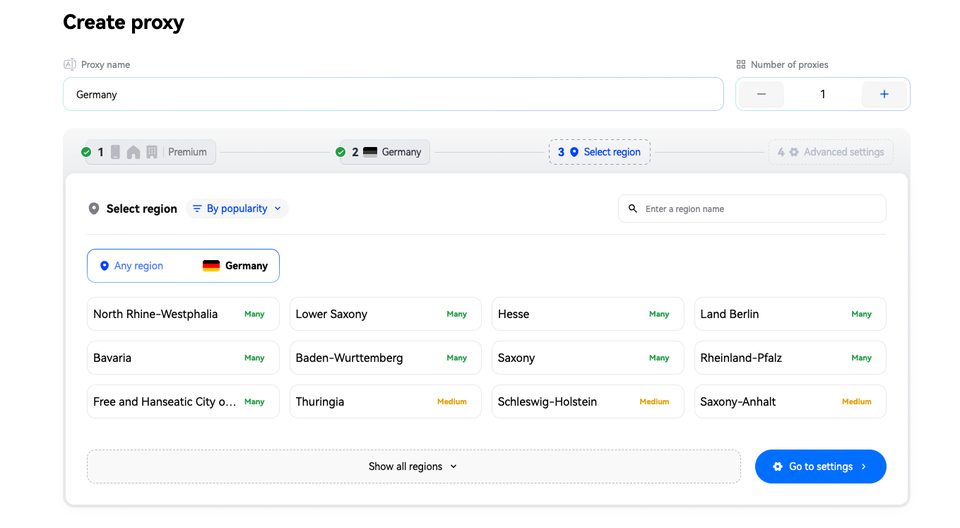
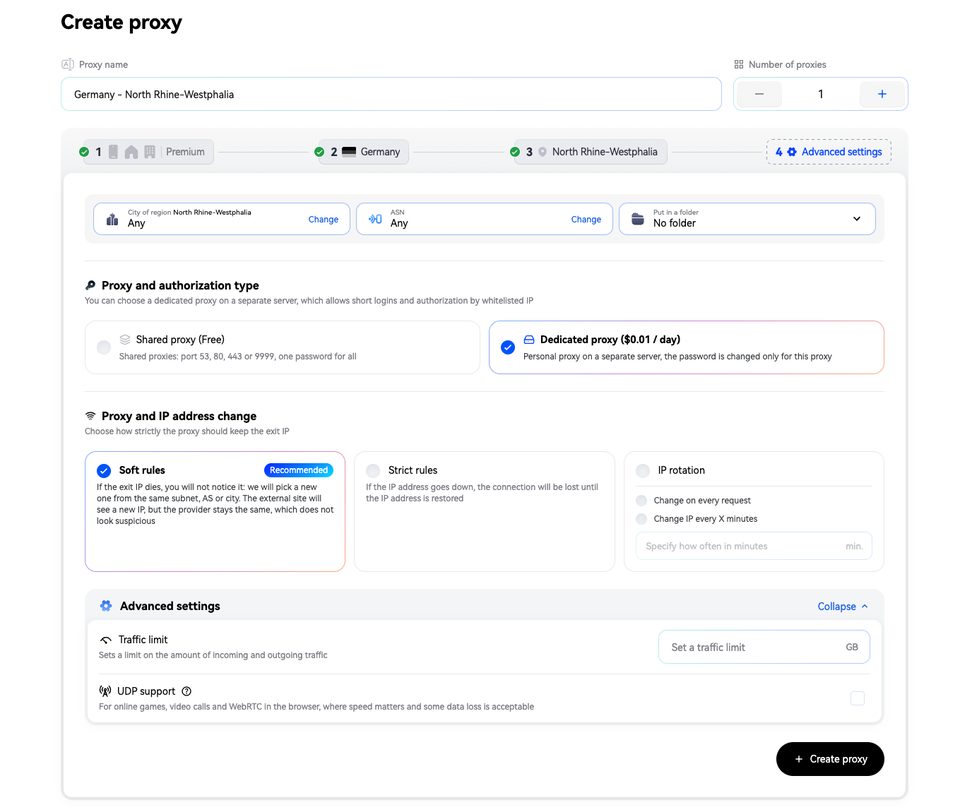
Step 2: Choose a Connection in SX.org
Select the country and connection type based on the purpose of your test. Do not choose a mobile proxy simply because you are promoting a mobile app.
First, decide what you want to check:
- Whether the page is accessible through an IP in a particular country.
- How the web funnel behaves through the selected connection type.
- Whether the result is consistent across multiple test sessions.
If your scenario requires the same exit IP throughout the journey, check the IP persistence and session conditions before starting.
Step 3: Connect the Proxy to Your Test Environment
Use the connection details provided in your SX.org account: the host, port, and applicable authentication credentials.
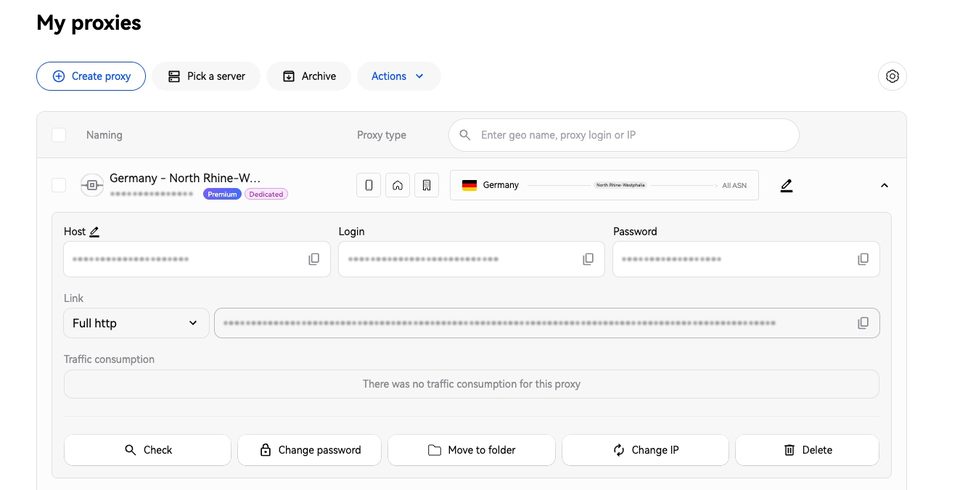
The setup process depends on your browser, operating system, or testing tool. Before proceeding, make sure the browser you are testing actually uses the proxy connection.
Next, verify the exit IP and its reported country with an IP-checking tool. Record the result in your test sheet. If the reported country does not match your intended market, resolve the connection issue before evaluating the landing page.
Step 4: Open the Landing Page in a Clean Test Session
Use a separate test profile or clear your site’s stored data before repeating the test. This helps prevent previous visits from interfering with your comparison.
Check the following:
- Does the page open without an error?
- Does the language match the expected version?
- Do images and key page elements load?
- Does a notice or banner cover an important button?
- Does the offer match the ad creative?
- Are support and legal pages accessible where they are included?
Check the mobile layout separately. Use a narrow-screen preview for an initial review, then complete the final walkthrough on a real iPhone.
Step 5: Follow Every Redirect to the App Page
Click the download button and record the final destination.
If the journey includes redirects, inspect the intermediate requests in your browser’s network panel. Look for specific problems:
- A failed request during the redirect chain.
- A return to a previous page.
- A redirect loop.
- A link to the wrong app.
- Missing parameters that your analytics implementation requires.
Not every parameter needs to remain visible in the final URL. Your pass criteria should reflect your tracking tool’s documentation and your actual implementation.
Campaign links used with App Store Connect analytics include dedicated parameters such as the campaign token ct and provider token pt. Checking UTM parameters on your landing page is not the same as validating the full app acquisition measurement setup.
Step 6: Repeat the Test and Document the Results
Follow the same steps and apply the same pass criteria for the next country.
Record the conditions as well as the outcome. For example:
France. Exit IP country verified. Browser language set to French. The landing page loaded, the download button was accessible, and clicking it opened the correct app’s product page. Screenshots and the final URL were saved.
This is much easier to reproduce than a note saying, “Everything looks fine in France.”
Example: Testing Two Markets
Suppose your team has prepared German and English landing pages. According to the campaign requirements, each campaign link should open the appropriate language version, and both download buttons should lead to the same app.
Your results might look like this:
| Check | Germany | United Kingdom |
|---|---|---|
| Landing page loads | Yes | Yes |
| Language matches requirements | Yes | Yes |
| Main button is accessible on a mobile screen | Yes | No - a notice covers it |
| Link leads to the correct app | Yes | Yes |
| Outcome | Ready for the next QA stage | Fix required |
This is an illustrative example. The goal is not simply to confirm that a page loads, but to identify specific obstacles in the user journey.
After a fix, repeat the failed scenario using the same settings. Then run a brief regression check across the other markets to make sure the change has not affected their page versions.
How to Choose a Proxy Plan for Your Testing Volume
For QA, the right connection depends on your workflow - not just the headline price. SX.org offers traffic-based billing as well as separate monthly proxy options with unlimited traffic.
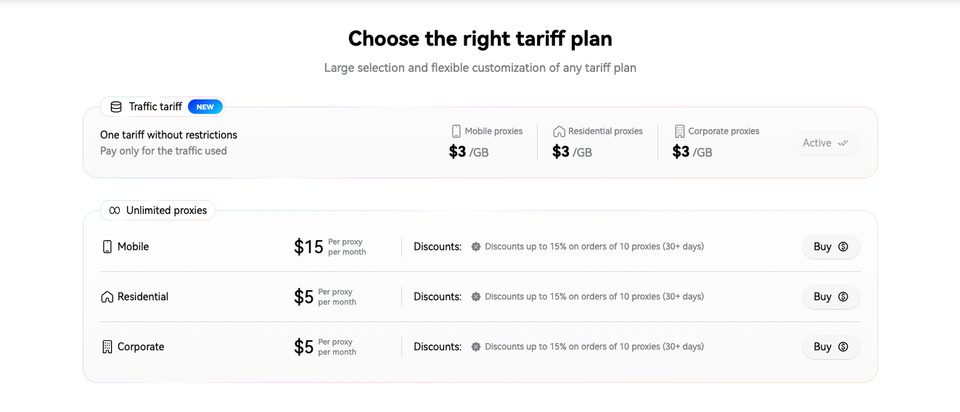
One-Off Checks Across Several Markets
If you are preparing a single campaign and need to check several countries, consider a traffic-based plan.
Before testing, define the pages you will visit and the number of test runs. This helps you estimate usage and avoid spending traffic on unrelated activity.
Recurring Checks in the Same Countries
If your team tests the same markets every week, compare traffic-based billing with the available monthly options.
Consider:
- Availability of your target country.
- IP persistence and rotation conditions.
- Compatibility with your test environment.
- The number of simultaneous tests.
- The total cost of recurring QA.
Do not confuse traffic allowance with session behavior. “Unlimited traffic” does not automatically mean the exit IP will never change. If your test requires a persistent address, confirm that condition separately.
What You Cannot Verify with a Proxy Alone
A regional connection is useful for testing the web portion of your funnel. It does not replace end-to-end testing of your iOS app.
A Proxy Does Not Change the Apple Account Region
The country or region associated with a user’s Apple Account determines the App Store they use to obtain apps. Opening a link through an IP in another country does not prove that the app is available for download to an account in that market.
Check country availability separately in App Store Connect, then validate the user journey with an appropriate test account and device.
A Country Code in the Link Does Not Lock the Storefront
A regional code in an App Store link does not guarantee that every user will remain in that storefront. Users may be redirected to the store associated with their account.
Do not flag a redirect as an error simply because the final storefront differs from the country code in the original link. Compare the result with the expected behavior for your test account first.
A Successful Page Load Does Not Confirm Attribution
A working download button confirms that the link opens. It does not prove that an install or a subsequent event will be attributed correctly.
Test attribution as a separate scenario using the documentation for your measurement platform. Account for reporting delays, minimum thresholds, and other reporting conditions. A missing metric immediately after a single test does not necessarily indicate a tracking failure.
Proxy Load Times Do Not Represent Every Local User
A proxy adds another node to the connection path. The loading time you observe should not automatically be treated as typical performance for users in that country.
Use this workflow primarily to check availability and page behavior. Evaluate performance separately, taking the device, network, and measurement conditions into account.
A Browser Test Does Not Replace a Real Device
Use desktop browser testing for initial diagnosis and request inspection. Complete the final walkthrough on an iPhone: open the campaign link, review the landing page, tap the download button, and confirm that the next step matches your intended journey.
If you need to test app functionality, authentication, or purchases, create a separate QA plan. A proxy-based landing page check does not cover those tasks.
Your Pre-Launch Checklist
Before launching the campaign, confirm that:
- Complete campaign URLs are ready.
- The expected language, offer, and destination are defined for each market.
- The exit IP and connection country have been verified.
- The landing page loads under the selected test conditions.
- Key elements are accessible on a mobile screen.
- Download buttons lead to the correct app.
- The redirect chain contains no errors or loops.
- Required analytics parameters and events have been checked.
- App availability has been verified separately for each target country.
- The user journey has been tested on a real iPhone.
- Results have been saved and resolved issues have been retested.
Set Up Your Regional Connections Before Launch
At SmartShop, we recommend building your test around a specific user journey: the URL a person opens, the content they should see, and the destination they should reach after tapping the download button.
For regional checks of the web portion of that journey, use SX.org to select your target GEOs, configure the connections in your test environment, and repeat the same scenario for each market.
Start with two priority countries and one campaign link. Document the results, fix any issues, and then expand testing to the rest of your target markets.
SmartShop readers can use the promo code Smart3GB in SX.org to get 3 GB of free traffic and test their landing pages and redirects from selected countries before launching ads.
Ready accounts with a 7-day guarantee. 10+ GEO options. Pay only after verification.
Order on Telegram