

Partner material: this article was prepared in collaboration with ProxyRed.
The answer depends on what you are trying to do. A workflow that needs continuity benefits from a stable IP, while large batches of independent regional checks usually benefit from IP rotation.
This guide explains the difference between sticky and rotating residential proxies, shows where each session type fits into legitimate iOS-related workflows, and highlights common configuration mistakes.
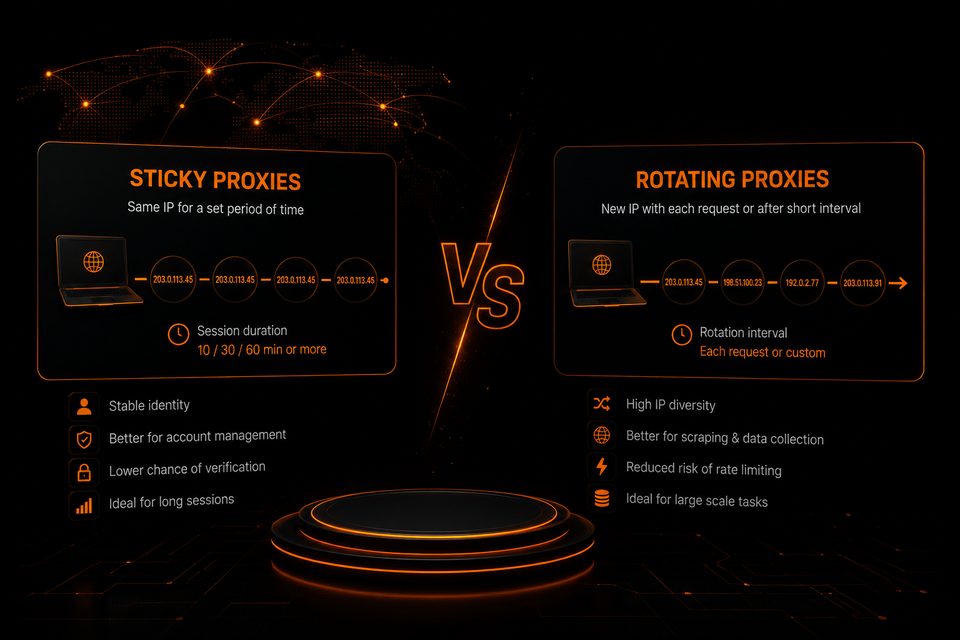
What Are Sticky Proxies?
A sticky session keeps the same residential IP address assigned to your connection for a specified period of time. Instead of receiving a new IP with every request, your traffic continues to originate from the same address until the session expires or is manually changed.
That consistency is useful whenever your workflow depends on maintaining the same network identity throughout a longer session.
Where Sticky Sessions Fit in iOS Workflows
- Long QA sessions where the same regional network environment should remain stable.
- Testing geo-sensitive APIs or backend behavior without changing network origin mid-session.
- Checking IP-dependent onboarding flows, web content, or regional access rules within one continuous session.
- Maintaining consistent network conditions during manual app testing.
- Long browser, WebView, or cloud-device sessions used by development and QA teams.
As a rule of thumb, if a test depends on continuity and a stable network-origin location, a sticky session is usually the better choice.
What Are Rotating Proxies?
Rotating proxies automatically assign a new IP address after each request or after a predefined interval. Instead of preserving one long-term identity, they maximize IP diversity.
This makes rotating sessions useful for large numbers of independent requests where each check can be treated separately.
Where Rotating Sessions Fit in iOS Workflows
- Large-scale checks of geo-dependent public web or API content across multiple regions.
- Comparing country-specific landing pages or publicly available regional content.
- Monitoring geo-dependent web pricing or public information at scale.
- Collecting public market data for localization research and competitive analysis.
- Repeated regional verification tasks where a fresh IP is preferable for each independent request.
If the goal is large-scale data collection or repeated independent checks, rotating sessions are usually the more suitable option.
Sticky vs Rotating: Which One Should You Choose?
| Task | Recommended Session | Why |
|---|---|---|
| Manual iOS QA in one GEO | Sticky | Keeps the network-origin GEO stable during the session |
| Geo-sensitive API testing | Sticky | Maintains the same IP location throughout a test flow |
| IP-sensitive onboarding or web flows | Sticky | Keeps the network context consistent across multiple steps |
| Large-scale regional availability checks | Rotating | Better suited to many independent requests |
| Regional web pricing research | Rotating | Improves IP diversity across repeated checks |
| Market and competitor research | Rotating | Useful for scalable public-data collection |
Simple rule:
- If you need continuity, use sticky sessions.
- If you need scale and IP diversity, use rotating sessions.
Practical Examples
1. Testing Geo-Sensitive App Behavior
Suppose a QA team needs to test how an iOS app, API, or related web flow behaves for users connecting from Germany. A sticky German residential IP can help keep the same network-origin location throughout login, onboarding, navigation, and other multi-step scenarios where backend behavior depends on IP geolocation.
2. Comparing Geo-Dependent Public Content Across Regions
If a team needs to compare public web content, landing pages, regional availability, or other IP-dependent information across multiple countries, rotating proxies can be more practical because each independent request can use a different residential IP.
3. Mixing GEOs During the Same Test
If the purpose of a test is to reproduce behavior that depends on a specific network location, the proxy IP should match the target GEO. Changing countries during the same test scenario can introduce additional variables and make the results harder to interpret.
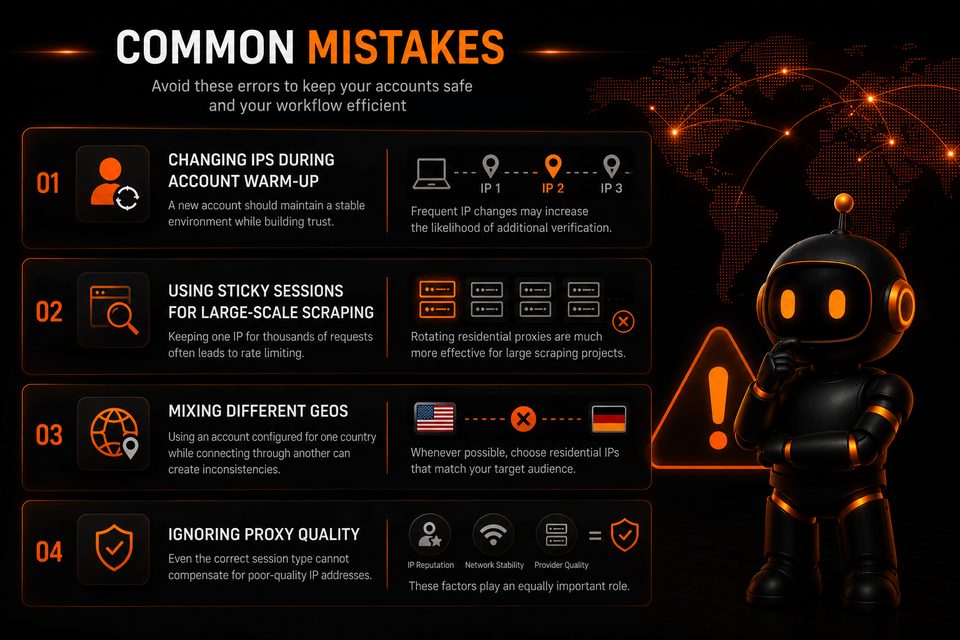
Common Mistakes
Changing IPs in the Middle of a Continuous Test
If you are validating one user journey, changing the IP halfway through can introduce an unnecessary variable. For longer sessions, it is usually better to keep the same IP until the scenario is complete.
Using One Sticky IP for Large-Scale Data Collection
Keeping one IP for a very large number of independent requests can lead to rate limiting. Rotating residential proxies are generally better suited to larger public-data collection workloads.
Mixing GEOs
If the purpose of the test is to reproduce a specific regional experience, use an IP that matches the target GEO. Mixing countries during the same scenario can make results harder to interpret.
Ignoring Proxy Quality
The right session type cannot compensate for poor-quality IPs. IP reputation, network stability, provider reliability, and technical support remain important regardless of whether you use sticky or rotating sessions.
Choosing the Right Residential Proxy Provider
Useful characteristics include:
- Broad GEO coverage.
- Stable sticky sessions.
- Flexible rotation options.
- HTTP(S) and SOCKS5 support.
- Reliable authentication methods.
- High-quality residential IP reputation.
- Responsive technical support.
Teams do not necessarily need separate proxy products for these scenarios. A provider that supports both persistent sessions and configurable rotation can cover stable regional testing as well as broader geo-distributed checks within the same infrastructure.
How ProxyRed Supports Both Workflows
ProxyRed is built around this flexibility: teams can use persistent residential sessions when a test requires a stable IP context and switch to rotating residential proxies for broader geo-distributed checks, research, and automation workloads.
The service offers:
- Residential rotating proxies.
- Sticky residential sessions.
- Login/password authentication, with IP whitelist authentication available on request.
- HTTP(S) and SOCKS5 protocols.
- Broad GEO coverage across supported locations.
- Flexible configurations for testing, research, automation, and international projects.
For iOS-related teams, this means the same proxy infrastructure can support both stable IP-based regional testing and larger multi-region verification workflows.
Final Thoughts
Sticky and rotating proxies solve different problems. Sticky sessions are designed for continuity, while rotating proxies prioritize IP diversity and scale.
For iOS QA and geo-testing workflows, sticky sessions are a natural fit when a test depends on maintaining the same IP-based regional context. Rotating sessions are more appropriate when teams need to perform many independent checks across regions or collect public data at scale.
Understanding the difference makes proxy configuration more predictable and helps teams choose the right network setup for each workflow.
ProxyRed supports both approaches, allowing teams to move between persistent and rotating residential sessions without changing proxy infrastructure.
Learn more about ProxyRed residential proxies and choose the session type that best fits your workflow.
Ready accounts with a 7-day guarantee. 10+ GEO options. Pay only after verification.
Order on Telegram