
Partner material: this article was prepared in collaboration with Octo Browser.
Octo Browser has a wide range of applications — from traffic arbitrage and bonus hunting to bounties, airdrops, e-commerce, web scraping, ticketing, and content monetization. In this review, we'll look at the main features and capabilities of Octo Browser.
What Octo Browser Can Do
The main purpose of an antidetect browser is multi-accounting with realistic digital fingerprints. Fingerprint spoofing happens at the Chromium core level, so checks on Pixelscan, BrowserLeaks, and Whoer pass without errors or warnings. Users can configure more than fifty fingerprint parameters, gaining full control over their digital profile.
All profiles can be copied, transferred, and exported, organized using folders and tags, and assigned access rights. 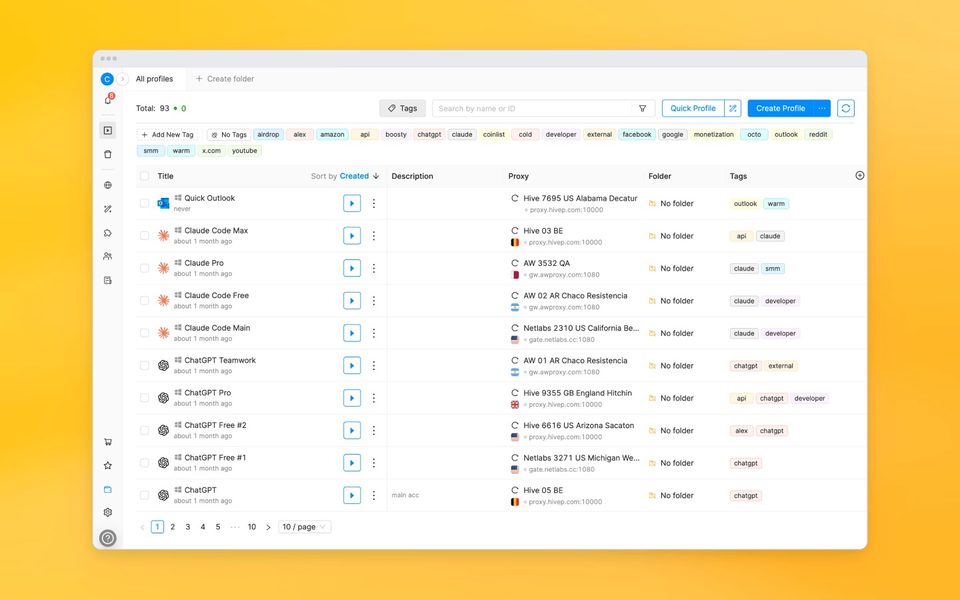
Cookie management is also well thought out: import is supported in Netscape and JSON formats, and a cookie robot automatically visits specified sites and collects cookies, saving time on warming up new accounts.
How to Create and Manage Profiles
There are several ways to create a profile. The simplest is the "Quick Profile" feature, which instantly generates a profile with a random fingerprint. If you need full control over the fingerprint, all its parameters can be configured manually. For example, you can choose a desktop fingerprint on Windows or macOS, or a mobile one on Android, and set the OS version, screen resolution, number of CPU cores, RAM amount, and GPU parameters. A profile can be password-protected, and you can install extensions from a preset list or upload your own.
For recurring tasks, there are templates: save a set of parameters and create new profiles based on them — manually or in bulk. If you need many profiles at once, the bulk creation feature allows you to make up to a hundred at a time. Advanced users can do this via the API.
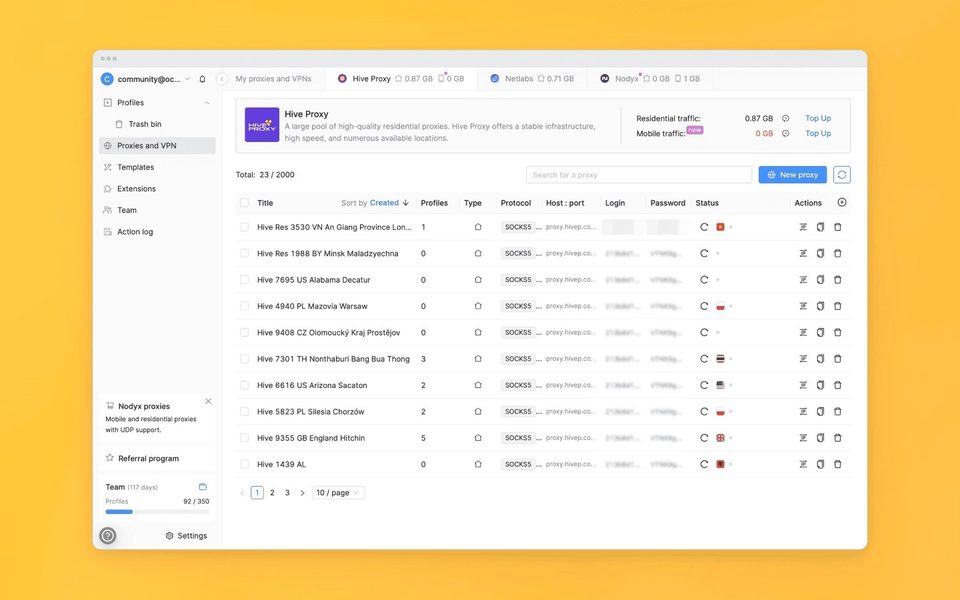
Connecting a proxy or VPN is straightforward: third-party proxies, purchases through the built-in shop, or assigning a VPN configuration. Cookies are loaded when creating a profile or collected automatically by the cookie robot.
Data Security
All profile data is stored on European cloud servers with AES-256 encryption. The architecture is designed so that even in the event of a hypothetical database leak, profiles remain inaccessible: each one is encrypted with a secret key, a unique key from the database, and a user key if the profile is password-protected.
Decryption is impossible without all three elements. Employee access to user data at Octo is strictly limited — they see only the minimal amount of information needed for analytics and notifications, but not activity inside profiles.
For teams, separate mechanisms are provided: access rights via tags and folders, an activity log, recovery of deleted profiles from the trash, and password protection for launching profiles. All of this significantly reduces the risk of leaks.
Pricing and Subscriptions
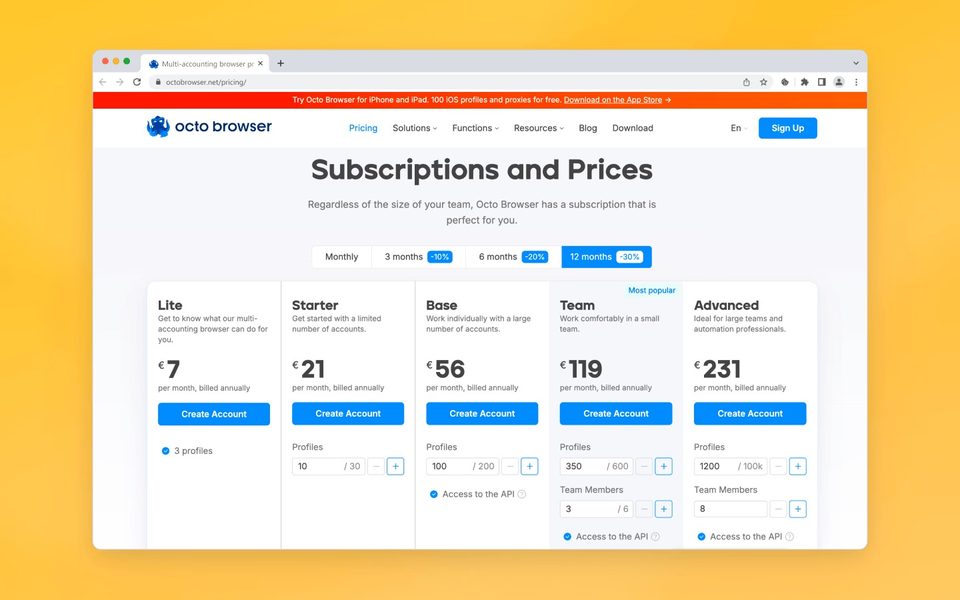
Octo's main pricing feature is flexibility. With all five plans (Lite, Starter, Base, Team, and Advanced), you can add extra profiles, team member slots, and API requests as needed without upgrading to a more expensive tier. Additional resources are connected instantly, and changes can be made every 30 days. Payment is accepted via bank cards, Google Pay, and cryptocurrencies.
You can try Octo Browser with a 30% discount using the promo code SMARTSHOP30. The promo code is valid for new users only.
Strengths and Weaknesses
Pros:
- High-quality fingerprints — the R&D team continuously analyzes anti-fraud systems of popular websites to keep fingerprints undetectable.
- Data protection is taken seriously: end-to-end encryption, two-factor authentication, and a tamper-resistant architecture.
- Flexible team management: access rights, profile passwords, tag-based restrictions, and an activity log.
- A functional and well-documented API.
- Resources scale to fit your specific project.
- The built-in proxy shop eliminates the need to find providers on your own.
- Fast support that offers tailored solutions.
- Mobile apps for iOS and Android let you create and launch profiles with mobile fingerprints directly from your smartphone or tablet.
Cons:
- The cost of the Starter and Base plans — despite flexible settings, some users may find the starting price high.
Conclusion
Octo Browser has everything you need for multi-accounting: API automation, Cookie Robot, quick profiles and templates, a proxy shop, UDP proxy support, VPN for profiles, a user-friendly interface, and two mobile apps. Some individual plans may seem expensive, but reliability and functionality make up for it — for safe multi-accounting, this tool is more than worthy.
Ready accounts with a 7-day guarantee. 10+ GEO options. Pay only after verification.
Order on Telegram